


An order can qualify a customer for several emails: a confirmation, shipping updates, product guidance, a thank-you, a review request, and a rewards message. Sending all of them as a fixed sequence can create unnecessary contact.
The useful question is what the customer needs next. A first-time buyer may need help setting up the product. A returning buyer may already know how to use it and care more about the reward they just earned.
Start with the purchase, the order’s status, and what the customer has done since. Those details should determine which emails they receive.
What exactly is a post-purchase email?
A post-purchase email is one that a completed order triggers, rather than a campaign calendar or a browsing session. Order confirmations, shipping updates, product guidance, thank-yous, review requests, loyalty messages and follow-on recommendations all belong to this group. Because the order has already happened, the customer is not being persuaded to buy. They are waiting for something, learning to use what they bought, or deciding whether it was worth repeating.
The intent follows from that. Each message should either tell the customer something about their order they need to know, help them get value from what they bought, or acknowledge something they have earned. A post-purchase email can lead to another purchase, but that is the result of the first one going well rather than the reason for sending.
Send an order confirmation email
The order confirmation gives the customer a record of their purchase. Send it when the order is placed, with the products, quantities, total, and delivery address clearly shown.
Explain what happens next, such as when tracking information will arrive. Include a way to contact the store if the customer notices an incorrect item or address.
Keep these details easy to find. The customer should be able to check their purchase without searching through promotional content.
Email example: Sundays — “Confirmed: Our retrievers have your order”
Build anticipation when the order ships
The shipping email answers the next question: when will the order arrive?
Lead with what shipped, a tracking link, and an estimated arrival window when available. Then, where useful, help the customer prepare for the product.
A planter buyer could choose a suitable spot before it arrives. Someone waiting for a desk could clear the space and check which tools they will need for assembly.
For example:
Your windowsill planter is on its way. Track your package below. While you wait, measure the spot you have in mind. Our sizing guide shows how much room to leave so you can lift the planter out of its tray.
The preparation tip should relate directly to the item in the shipment. If there is nothing useful to prepare, the shipping information can stand on its own.
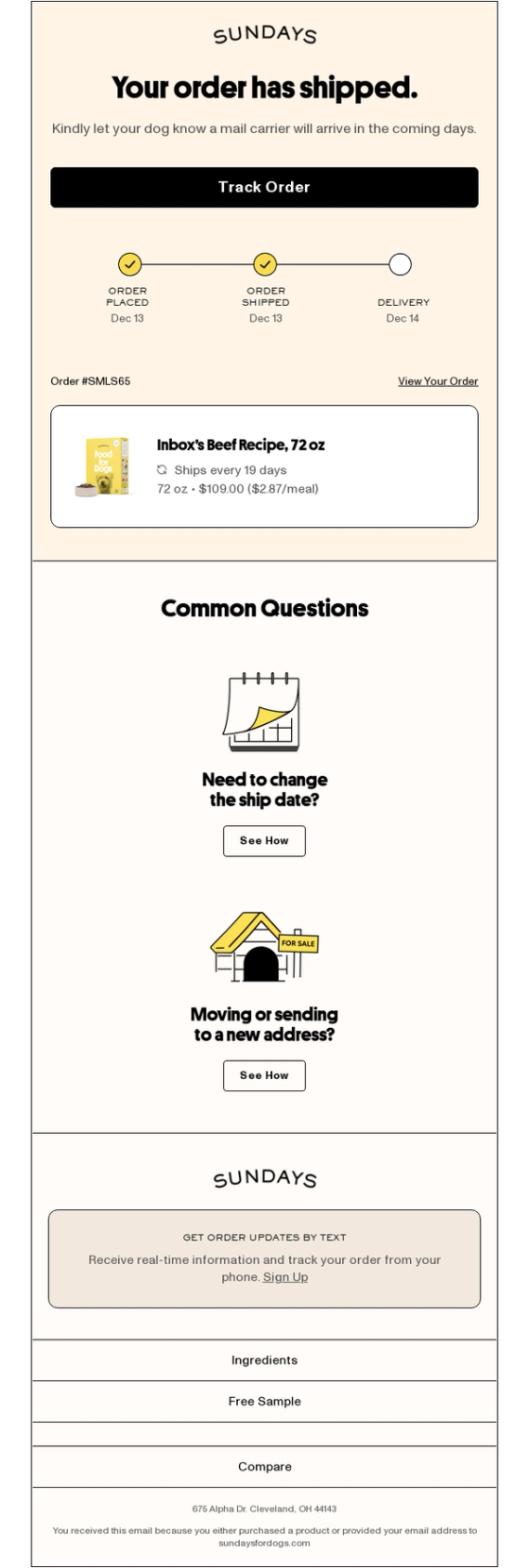
Sundays
tracking, a delivery date, and the questions that come up before arrival
Sundays opens with the shipping confirmation and a Track Order button, then shows a three-step tracker: order placed, order shipped, and the expected delivery date. The order number, a link to the order, and the item itself follow underneath.
The email answers when the order will arrive before anything else. A Common Questions block below handles the two things customers raise at this point, changing the ship date and sending to a new address, so a shipping update does not have to turn into a support ticket.
Help customers set up, use, or care for the product
Product guidance should help the customer get started or avoid a problem.
If the item needs assembly, show the first step and link to instructions for that model. If it is ready to use, explain one practical way to begin. If it needs special care, put the most important instruction in the email.
For a planter with a removable insert and tray, a first-use email could show how the parts fit together. A later care email could explain something useful after the customer has watered it a few times.
These do not automatically need to be separate messages. If one short guide answers both questions, send it once.
Returning customers may need less guidance. Someone buying the same product again probably does not need the introduction they received with their first order.
Email example: Blendtec — “Kickstart Your Blendtec Journey with 3 Recipes”
Check in after the customer has used the product
Instructions explain what to do. A check-in helps you understand how it went.
Give the customer enough time to use the product, then ask one clear question. Let them reply directly or use a short private form.
For a planter, that might mean checking in after they have had a reasonable chance to set it up and water it:
How did setup go with your windowsill planter? If anything was unclear, reply and tell us where you got stuck. We read every response.
The answers should influence what happens next. Someone who needs help should receive that help before another promotional message.
Repeated questions can also reveal where the product instructions need improvement.
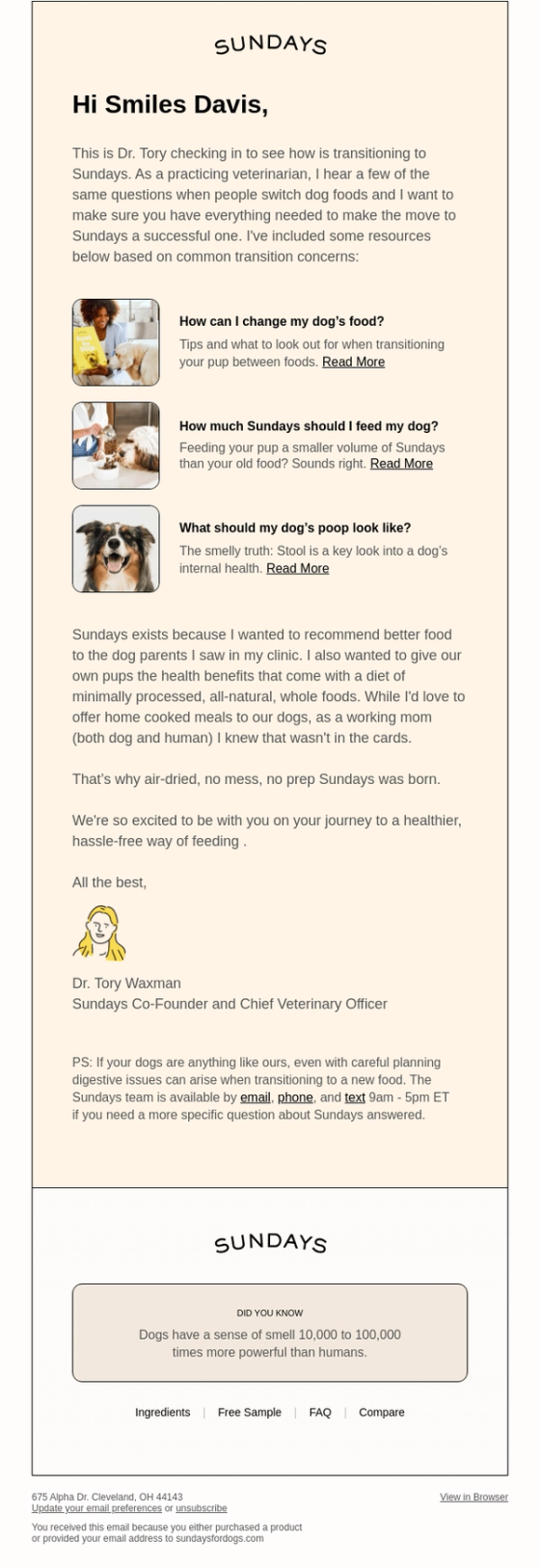
Sundays
the co-founder asks how the transition is going
The email comes from Dr. Tory Waxman, Sundays’ co-founder and chief veterinary officer, and opens by asking how the dog is settling into the new food. Three linked articles follow, each answering a question customers hit while making the switch.
The timing is tied to where the customer is with the product rather than to a date on a calendar. The sign-off offers email, phone, and text, so a customer who is stuck has somewhere to reply.
Thank the customer after delivery
A thank-you can acknowledge the purchase without asking the customer to do anything else.
Thank a first-time buyer for giving the store a try. Thank a returning buyer for coming back. A specific detail about their purchase can make the message more personal, such as why the team designed the planter with a removable tray.
A short note from the people who made or packed the order can be enough. It does not need to include a review request, discount, and product recommendation.
Send those messages when there is a separate reason for the customer to act on them.
Email example: Homes Alive Pets — “Thank You For Your Purchase!”
This is a reference for the thank-you message itself. Really Good Emails does not record whether delivery triggered it.
Ask for a public review when the buyer can describe the experience
A private check-in helps your team understand the customer’s experience. A public review helps other shoppers decide whether to buy.
Give the customer enough time to form an opinion. Then identify the purchased item and link directly to its review form.
A specific question can make the request easier to answer. For a windowsill planter, you could ask how it fit the space or how straightforward it was to set up.
Keep the request focused and invite honest feedback across the eligible audience. A positive response to a private check-in should not be a requirement for receiving a review invitation.
Once the customer submits a review, stop asking them to review the same purchase.
Email example: Vuori — “Review your Vuori purchase”
Send the loyalty email that fits the customer’s account
A purchase can create several loyalty opportunities. The right email depends on whether the customer is a member, what they earned, and which benefits are available.
Invite eligible non-members to join
Explain the benefit of joining in terms the customer can understand.
Show how members earn points, give an example of what those points can buy, and provide a direct signup link.
Be clear about the order they just placed. If joining allows them to claim points from that purchase, explain how. If earning begins with their next purchase, say so.
Existing members do not need this invitation. They need information about their own points and benefits.
Email example: Dr. Squatch — “Get rewarded for your order”
Tell members what they earned on the order
Once the points are credited, separate the amount earned from the total available balance.
A member who already had 150 points and earned another 200 now has 350 points. Showing both figures makes the update easier to understand.
Explain what the balance allows them to redeem, or how far they are from the next reward. Link to the rewards page and make the next action clear.
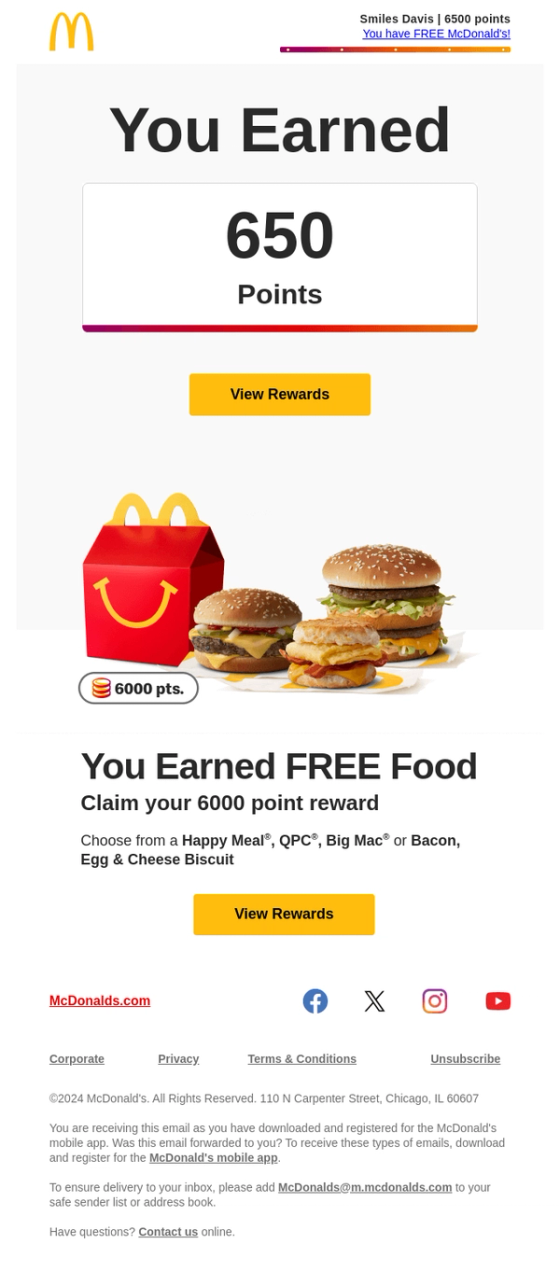
McDonald’s
the points earned on this order, next to the running balance
The email leads with the points earned on the order, 650, while the header carries the running balance and a progress bar toward the next reward. Both numbers are visible without scrolling.
Lower down, the email names what the balance already unlocks, a 6,000-point reward, and lists the four items it can be exchanged for. The member can see what they earned, what they hold, and what it is worth in one pass.
Remind members about a reward they can use
A reward reminder needs a specific benefit.
If the customer has enough points to claim a reward, show what they can get and how many points it costs. If they have already claimed a code, show the code and explain where to use it.
Include any minimum spend, eligible products, or expiry date that applies. Check that the reward is still available before sending, and stop the reminder after it has been used.

Starbucks
what the balance is worth at every level
The email sets out the redemption ladder in order: 25 Stars for a drink customization, 60 for up to $2 off an order, 100 for a brewed coffee or a bakery item, and 200 for a handcrafted drink or hot breakfast. Each level names the value it carries.
This is a general rewards guide rather than a reminder about one member’s available reward, so the balance and the expiry date are missing. What it does show is worth copying: a member should not have to work out for themselves what their points are for.
Offer double redemption value for a limited time
A temporary redemption offer changes what the customer’s existing points can buy.
Consider this illustrative example. A member earns 200 points on a qualifying November 23 order and already has 150 points, bringing their available balance to 350.
Normally, redeeming 200 points takes $10 off. For the next 20 days, through December 13, those same 200 points take $20 off. Future purchases continue earning points at the usual rate.
The email could say:
You earned 200 points on your order and have 350 points available. Through December 13, 2026, redeem 200 points for $20 off instead of the usual $10. Select Redeem 200 points on your rewards page to claim the offer.
The distinction matters: the customer receives more value when spending their points. They are not earning points at twice the normal rate.
This is a proposed offer, not a default loyalty-platform feature. The store must support the redemption rate, define the purchase conditions, and provide a working way to claim it.
Recognize a member who reaches a new tier
When a purchase moves the customer into a higher tier, explain what changed.
Name the new tier and lead with a benefit they can use. If they have unlocked early access to the next collection, tell them when access begins and how they will receive it.
The status should have a clear meaning. After reading the email, the customer should understand what their purchase unlocked and what they can do next.
Email example: Native — “You’ve earned a new rewards status: Cucumber Connoisseur!”
Recommend a product that goes with what they bought
A post-purchase recommendation should have a clear connection to the item the customer owns.
Someone who bought a windowsill planter might find an additional insert useful for starting another set of herbs. Show the insert that fits their model and explain what it allows them to do.
Check that the item is available and that the customer did not already buy it. The recommendation should also fit their situation: someone still struggling to set up the original product may need help before another purchase suggestion.
An offer is optional. Consider the product margin and the customer’s previous buying behavior before adding one. A useful companion product can give the customer a reason to return without a discount.
Email example: Ugmonk — “How’s Analog going so far?”
The “Shop Analog Accessories” section recommends accessories and refills that work with the purchased product.
Choose the messages that fit the purchase
These emails are options, not a sequence every customer needs to complete.
A first-time planter buyer may benefit from setup guidance and a check-in. A returning buyer who has just reached a new loyalty tier may care most about the benefit they unlocked.
Let customer behavior change the follow-up. Answer a support question before sending a recommendation. Stop reminders for reviews or rewards once the customer has acted. Skip guidance that the customer no longer needs.
Frequency should reflect those decisions. Review what each customer will receive across post-purchase emails, promotional campaigns, and other journeys.
Over time, purchases, replies, clicks, and reward use can help the brand understand which messages are useful and how much contact different customers need. Use that evidence to adjust both the content and the spacing.
Nexie is an AI-native ESP for e-commerce brands. It reads your customer data across engagement, recency, category interest and lifetime value together, surfaces the audiences worth campaigning to, and builds those campaigns for your team to review and approve, inside the guardrails and marketing policies you set. See how it works →