


An ecommerce email template saves you the work of designing every email from scratch. The same layout can support different products, messages, offers, and next steps as the customer’s situation changes.
Choose what goes into it based on what the customer needs and what your business can offer. A purchase, a support request, or a change in stock can change the follow-up or remove the need for it.
Below are eight email categories, with guidance on when to use them and two real designs for each. Offers shown in the archived examples may have expired.
Choose the template by what the customer needs to do
| Email category | Main customer action | What to check before sending |
|---|---|---|
| Welcome | Claim the signup benefit or start browsing | What the signup promised and whether the subscriber already bought |
| Abandoned cart | Return to checkout | Whether the customer already purchased and the items are available |
| Promotional | Shop an offer, explore a collection, or preorder | Product eligibility, stock, offer terms, and deadline |
| Post-purchase | Follow the order or get started with the product | Order status, the product purchased, and whether guidance is needed |
| Educational | Learn how to choose, use, or care for a product | Whether the topic matches the customer’s interests or purchase |
| Product recommendation | Find a relevant product or compatible accessory | Product relevance, compatibility, availability, and previous purchases |
| Loyalty and rewards | Check points, redeem a reward, or use a benefit | Current balance, tier, reward status, and eligibility |
| Win-back and re-engagement | Return to the store or confirm email interest | Normal purchase cycle, recent activity, and previous follow-ups |
Welcome emails
What the email is
A welcome email confirms the signup and delivers what the subscriber was promised. That might be a discount, early access, a guide, or membership benefits.
It also introduces the store and gives the subscriber a useful next step.
When to send it
Send the first email after signup so the subscriber can access the promised benefit. Choose later messages based on what they browse, click, or buy.
Once they purchase, stop reminders asking them to place their first order.
What it should address
Put the signup benefit near the top, explain any conditions, and make the next action clear. Keep the brand introduction short enough that it does not bury the reason the person subscribed.
The signup promise should shape the email. Someone joining a membership program needs instructions for using their benefits, while someone subscribing for a discount needs the code and a relevant place to shop.
Someone who requested a brewing guide should receive that guide, with useful coffee content as a possible follow-up. If they buy, the next message should help with the purchase.
Email design examples
Welcome
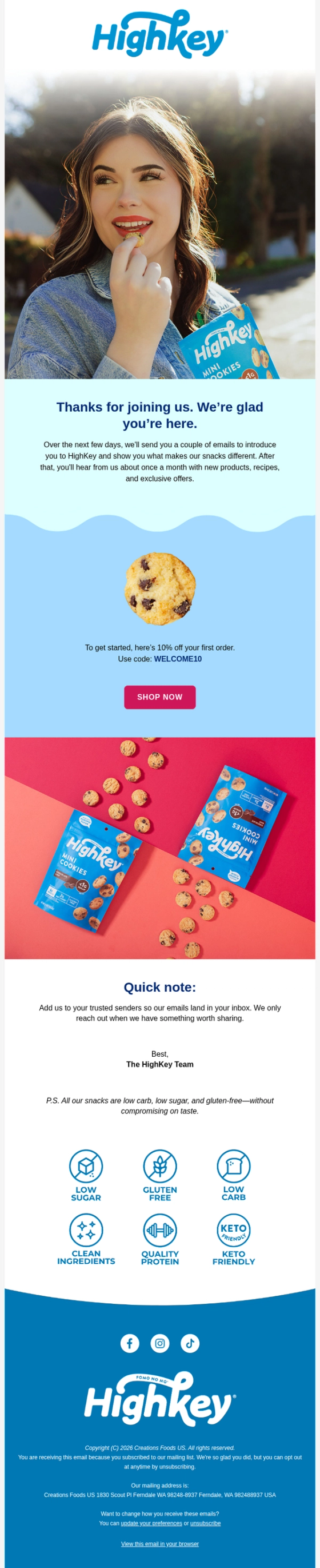
HighKey
first-order welcome
HighKey separates the welcome message, first-order offer, and product introduction into distinct blocks. The code and shopping button sit together, making the offer easy to find.
Create your welcome email with Nexie.
Welcome
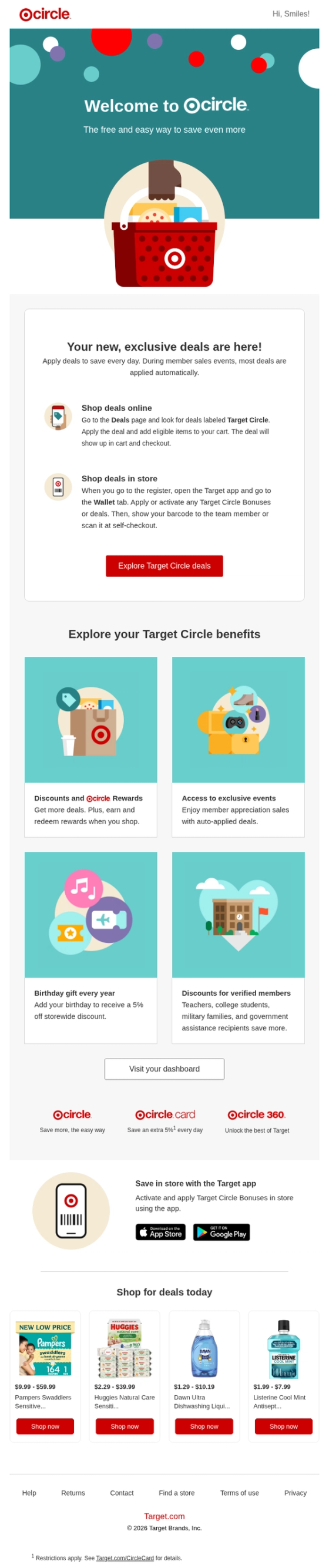
Target Circle
member welcome
Target Circle explains how to use membership benefits online and in store. The instructions appear before the fuller list of perks, helping new members understand how to get started.
Design your member welcome with Nexie.
Abandoned cart emails
What the email is
An abandoned cart email reminds a shopper what they left behind and gives them a direct route back to checkout. The product should be easy to recognize, with a clear button for continuing the purchase.
When to send it
Send after an eligible shopper leaves a cart without completing the purchase. Before each follow-up, check whether they already bought and whether the items remain available.
Stop the reminders once the purchase is complete.
What it should address
Show the abandoned product, selected variant, and relevant purchase details. If another message is useful, use it to answer a question about sizing, shipping, returns, or payment options.
The question worth answering can differ between customers. A first-time clothing buyer may need help choosing a size, while a returning customer buying their usual size may only need the cart link.
A discount is optional. Consider one when previous buying behavior gives you a reason to expect it will help and the order margin supports it.
Email design examples
Abandoned cart
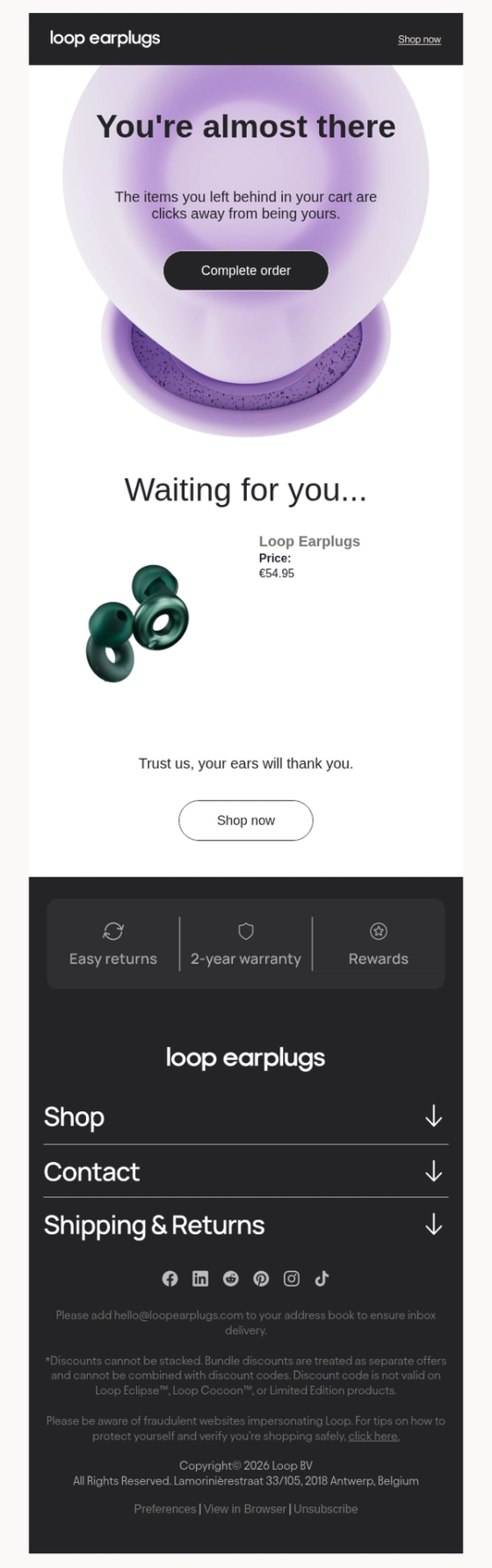
Loop Earplugs
a quick route back
Loop places a checkout button before the main product image. A second product block gives shoppers another opportunity to return to their order.
Design your cart reminder with Nexie.
Abandoned cart
Imbodhi
reassurance before buying
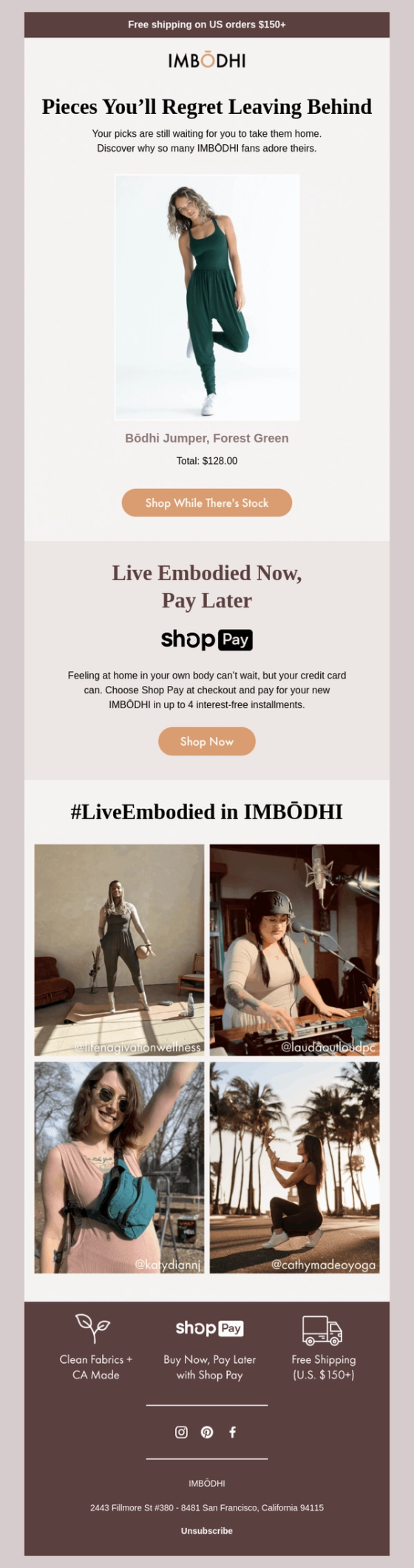
Imbodhi follows the product image and shopping button with payment information and customer photos. Those sections give the shopper more information before buying.
Create your cart email with Nexie.
Promotional emails
What the email is
A promotional email gives customers a reason to consider a product or offer now. It can announce a sale, introduce a collection, or invite shoppers to preorder.
When to send it
Send when there is a relevant offer, launch, or seasonal reason to buy. Choose the audience based on the products featured and the interests customers have shown.
Check that the products and offer will still be available when the email arrives.
What it should address
For a sale, explain the savings, eligible products, and deadline. For a launch, show what is new, why it matters, and whether customers can buy immediately or preorder.
The offer should support a clear business goal. A gift above a spending threshold, for example, needs available gift stock and enough margin to support it.
The same promotional layout can lead with product benefits for someone who usually pays full price. For someone who usually buys during promotions, it could lead with a relevant offer when stock and margin allow.
Email design examples
Promotional

Ooni
sale with a comparison grid
Ooni keeps the “almost everything” qualifier visible in its sale headline. A product grid shows prices and individual shopping buttons, with offer details farther down.
Create your sale email with Nexie.
Promotional

Krispy Kreme
seasonal preorder
Krispy Kreme introduces its seasonal collection through one large product photo. Individual flavor cards help customers choose, while the preorder button makes the available action clear.
Design your launch email with Nexie.
Post-purchase emails
What the email is
A post-purchase email helps the customer follow their order or get more from what they bought. Its purpose changes as the order moves from purchase to delivery and use.
When to send it
Match the message to the order stage and the customer’s experience. An order acknowledgment belongs after purchase, while product guidance should arrive when the customer can use it.
Give buyers enough time to try the product before asking them to describe their experience.
What it should address
An order update should make the status and next step easy to find. A product-use email should help the customer begin, solve a common problem, or care for the item.
A first-time blender buyer may need help with settings and a first recipe. Someone buying the same model again may already know the basics and find a relevant accessory or rewards update more useful.
Choose the follow-ups that fit the purchase, and give the customer a clear way to get help. If they report a problem, address it before sending another purchase suggestion.
Email design examples
Post-purchase
Urth
order acknowledgment
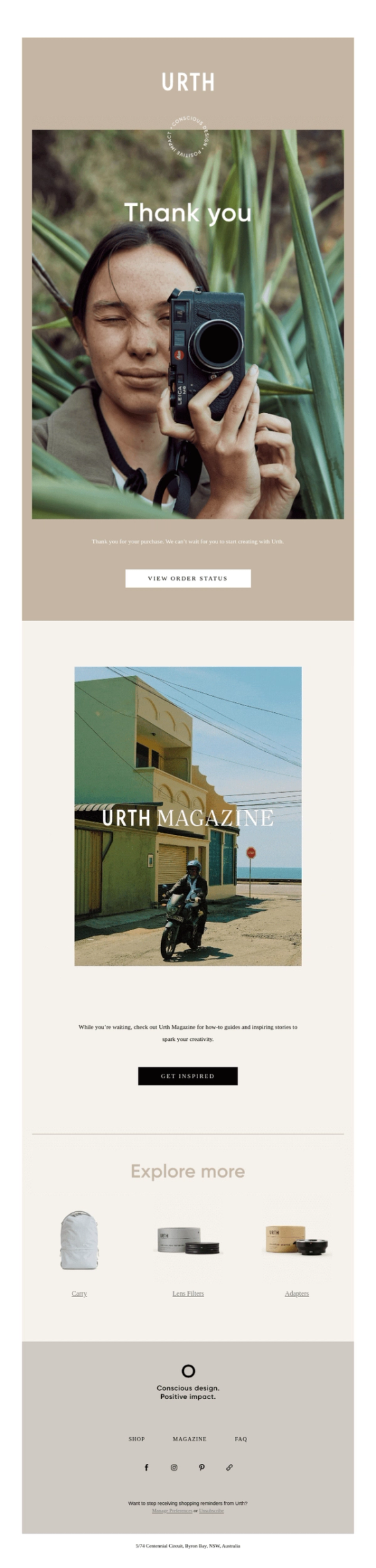
Urth thanks the buyer while they are waiting for the order. The order-status button appears before a magazine link, keeping purchase information first.
Design your purchase acknowledgment with Nexie.
Post-purchase
Blendtec
product guidance
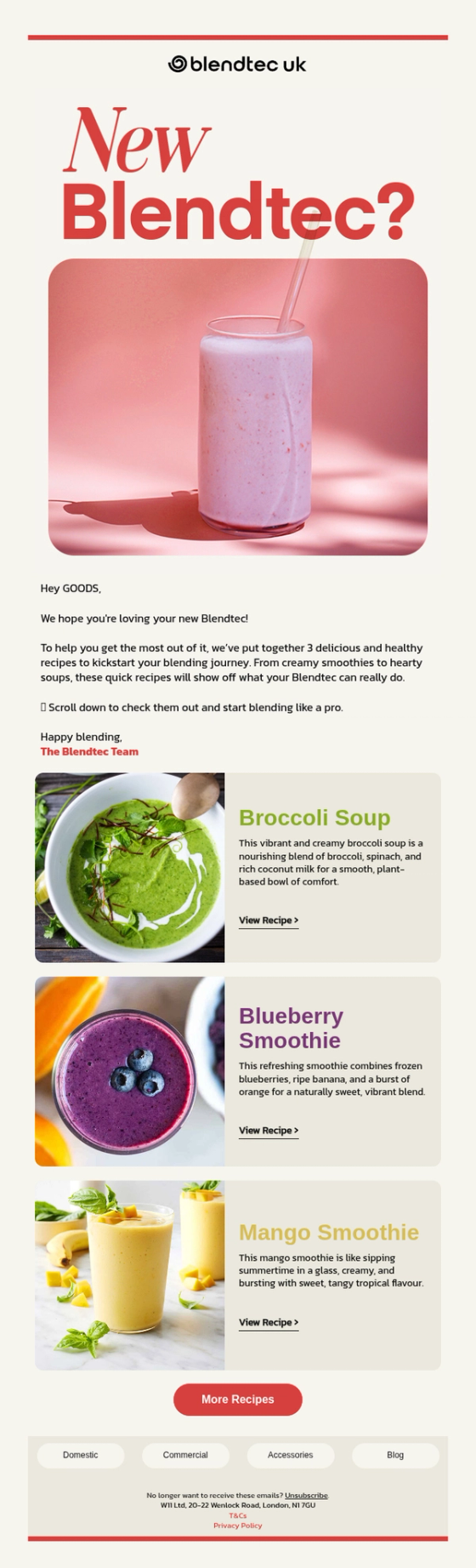
Blendtec gives a new blender owner three recipes to try. Matching recipe cards make the options easy to compare and give each recipe its own link.
Create your product guide email with Nexie.
Educational emails
What the email is
An educational email answers a useful question about choosing, using, or caring for a product. It can help someone make a purchase decision or improve their experience with something they already own.
When to send it
Send when the topic matches an interest the customer has shown or a product they bought. A coffee-grinding guide could help someone exploring home brewing or learning to use a new grinder.
Let their next action influence the follow-up. A purchase may change which advice is useful.
What it should address
Focus on one question and give the reader something useful within the email. Link to a longer guide when the explanation needs more space.
Someone comparing grinders may need help choosing the right model for their brewing method. Someone who already owns the grinder may need a short cleaning guide.
A product recommendation can follow the lesson when it helps the reader apply it. The advice should still be useful without a purchase.
Email design examples
Educational

Methodical Coffee
grinding guide
The grinding email introduces a specific brewing question and links to a guide. A separate grind-size chart offers a downloadable reference before the product recommendations.
Create your educational email with Nexie.
Educational
Methodical Coffee
enjoying black coffee
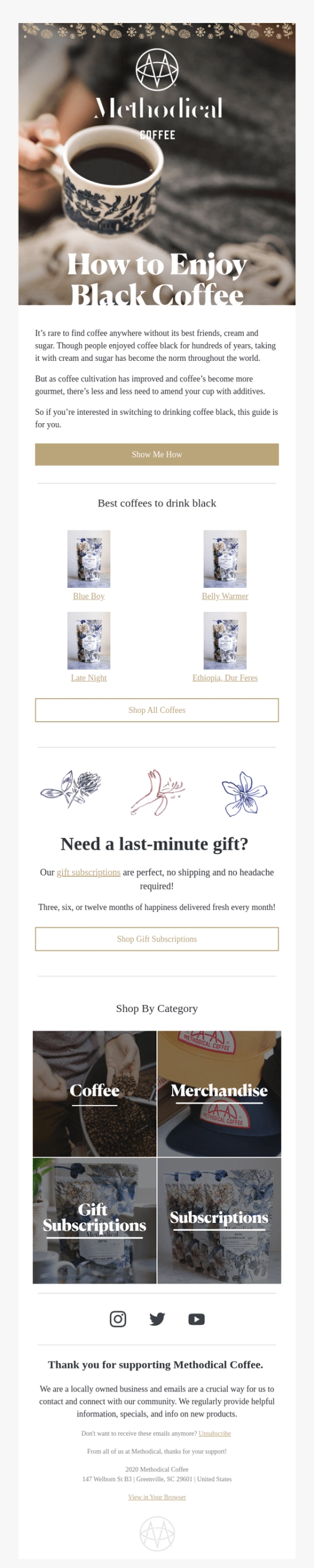
The black-coffee email explains who the guide is for and gives it a clear reading button. A selection of coffees suited to the topic follows the educational introduction.
Design your guide email with Nexie.
Product recommendation emails
What the email is
A product recommendation email helps the customer find something relevant to their interests or previous purchase. It might suggest a compatible accessory, a useful refill, or an item in a category they have explored.
When to send it
Send when there is a clear reason for the recommendation. A customer who bought a desk organizer may need compatible accessories, while someone browsing skincare may benefit from help choosing between relevant products.
Check their latest purchases before sending so the recommendation reflects what they already own.
What it should address
Explain why the product is worth considering. Show compatibility for an accessory and the specific need each item addresses when recommending several options.
Check availability and previous purchases. A customer who bought a desk organizer and already added its accessories does not need the same bundle suggestion.
You can keep the product-card layout while choosing another useful item or skipping the recommendation. An empty space in the email calendar is preferable to a suggestion with no clear value for the recipient.
Email design examples
Product recommendation

Ugmonk
compatible accessories
Ugmonk includes an accessories section within its Analog follow-up. Refills and compatible accessories give the owner specific ways to extend their existing purchase.
Design your accessory email with Nexie.
Product recommendation
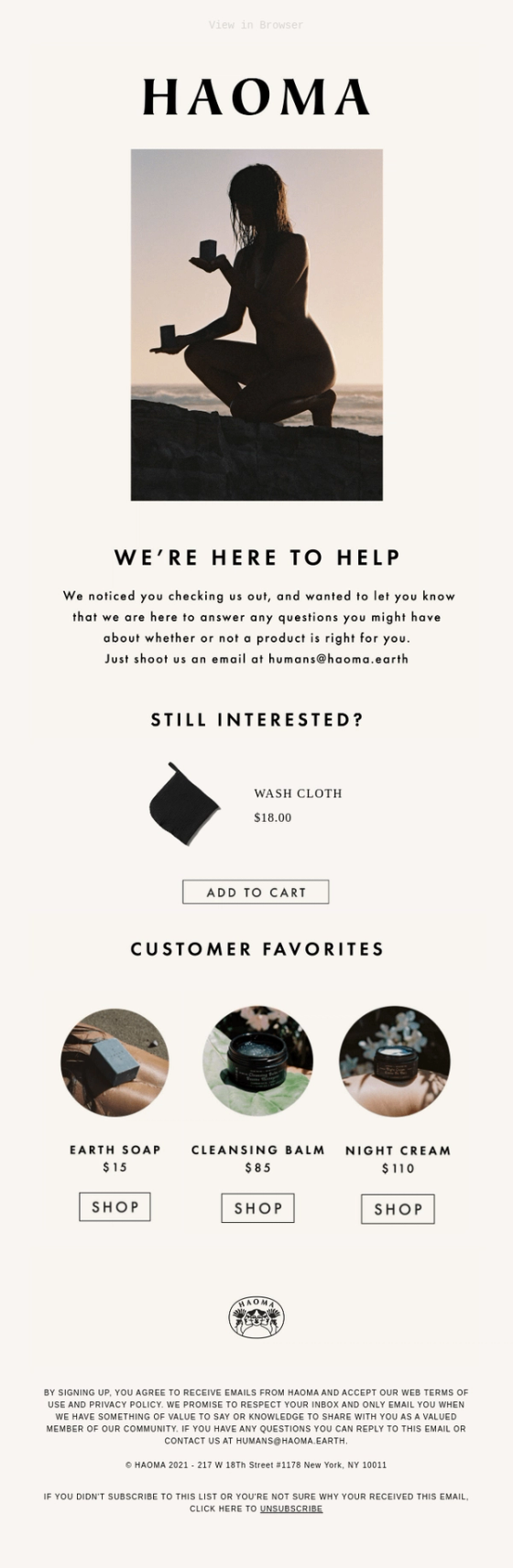
Haoma
product interest and related options
Haoma offers help, shows an item under “Still interested?”, and follows it with customer favorites. The layout separates the previously considered item from the broader recommendations.
Create your recommendation email with Nexie.
Loyalty and rewards emails
What the email is
A loyalty email explains what changed in the customer’s account or what they can do with their benefits. Points earned, an available reward, and a new membership tier each need a different message.
When to send it
Send when points are credited, a useful reward becomes available, or a purchase unlocks a new tier. Check the member’s current account before sending a reminder.
If they have already redeemed the reward, update or cancel the reminder.
What it should address
Show the relevant update and make the next action clear:
Points earned: separate the points added from the total available balance.
Reward to claim: name the reward, its points cost, and how to redeem it.
Reward already issued: show the usable code and its purchase conditions.
Temporary redemption offer: explain what the same points normally buy, their temporary value, and the deadline.
New tier: name the tier and the first benefit the member can use.
Include any minimum spend, eligible products, or expiry date that applies.
The design can stay consistent while the balance, reward, and next step change. A member with enough points to claim a reward needs a different message from someone still working toward it.
Email design examples
Loyalty and rewards
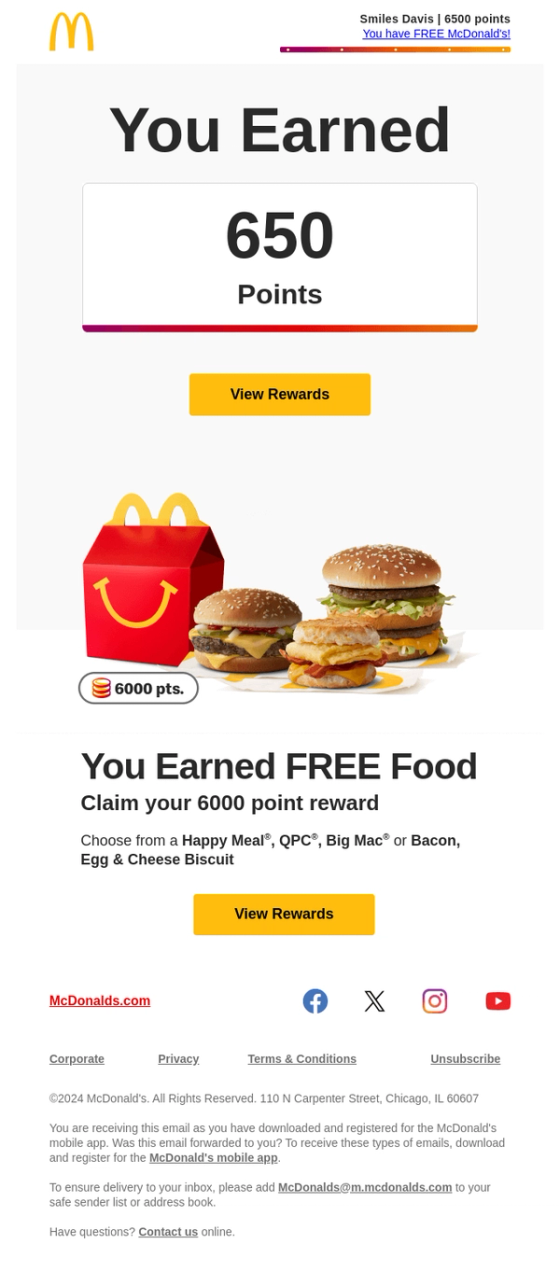
McDonald’s
points earned
McDonald’s gives points earned, total balance, and a reward threshold their own spaces. The layout helps the reader distinguish what they earned from what they can redeem.
Create your points update with Nexie.
Loyalty and rewards
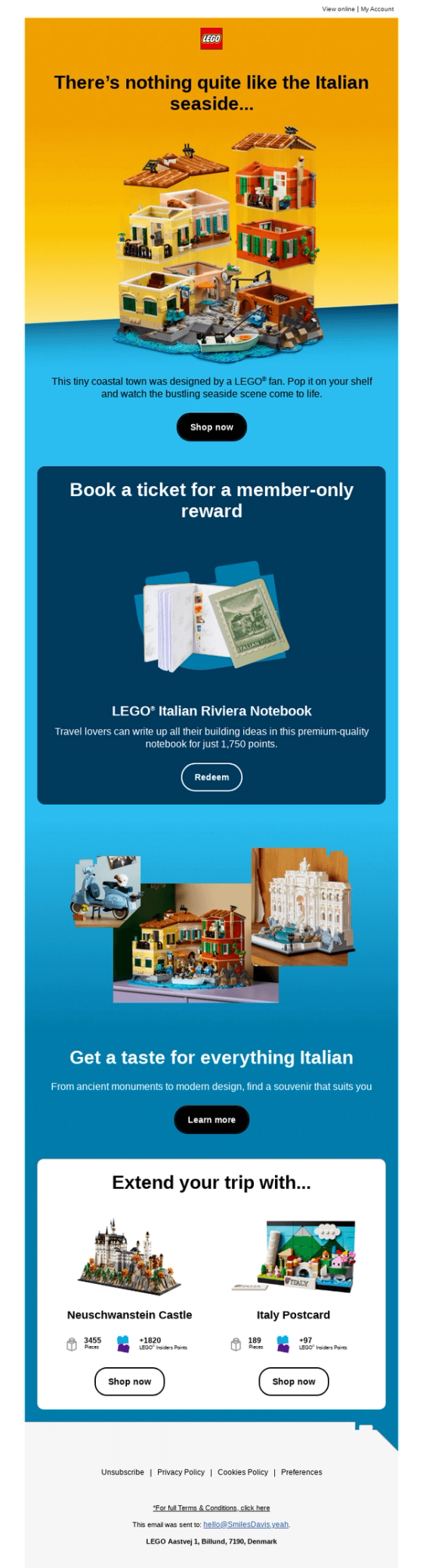
LEGO
a specific redemption
LEGO places a contrasting reward card within a broader product email. The notebook image, points cost, and redemption button make the reward action distinct from shopping.
Design your rewards email with Nexie.
Win-back and re-engagement emails
What the email is
A win-back email gives a previous customer a relevant reason to buy again. A re-engagement email can ask an inactive subscriber whether they still want to receive your emails.
These messages serve different purposes, so the main action should reflect the reason for contacting the person.
When to send it
Compare the customer’s usual purchase cycle with their recent activity. Someone still within their normal buying window may need more time.
A customer who has stopped opening emails but recently bought again should not receive a message asking them to return as a lapsed buyer. Update the audience when they purchase.
What it should address
For a purchase-focused email, show something worth returning for, such as relevant new products or a useful restock. Recent browsing and previous purchases can help you choose what to feature.
Use an incentive when buying history suggests it matters and the margin supports it. A discount does not need to be the starting point for every customer.
For a subscription check, explain what the reader will keep receiving and make the confirmation action clear. Make unsubscribe and preference links easy to find, and stop or reduce contact when continued follow-ups receive no response.
Email design examples
Win-back and re-engagement
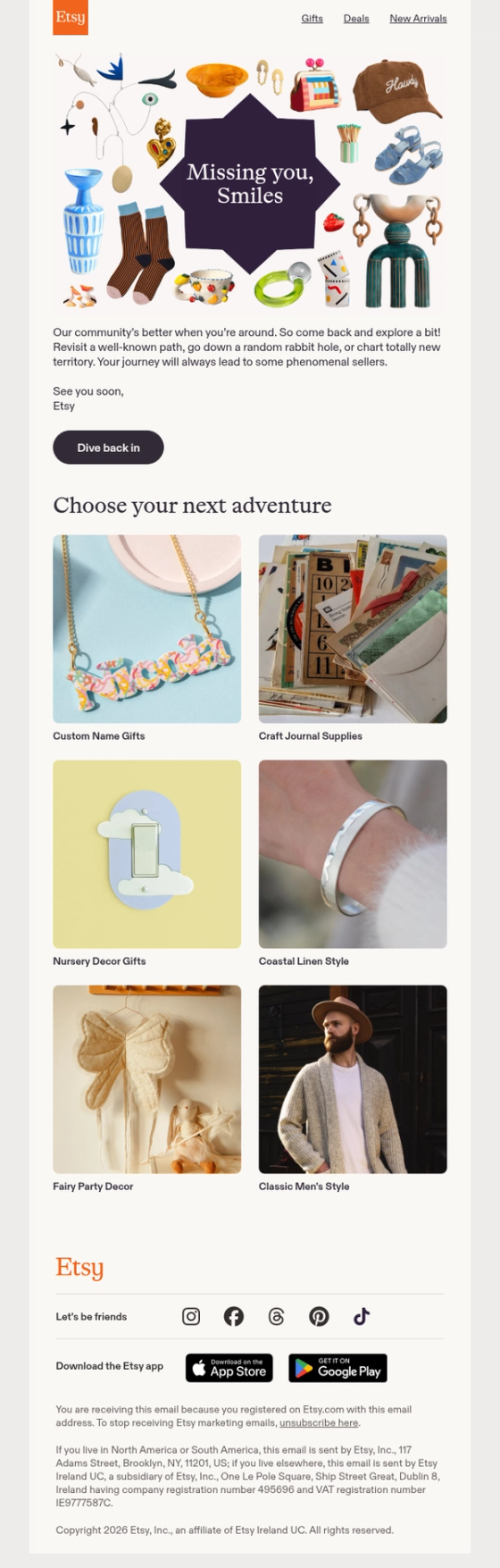
Etsy
a reason to explore again
Etsy uses a product collage and category cards to offer several routes back into the marketplace. The email invites exploration without leading with a discount.
Create your return-to-store email with Nexie.
Win-back and re-engagement
Belgian Boys
a subscription check
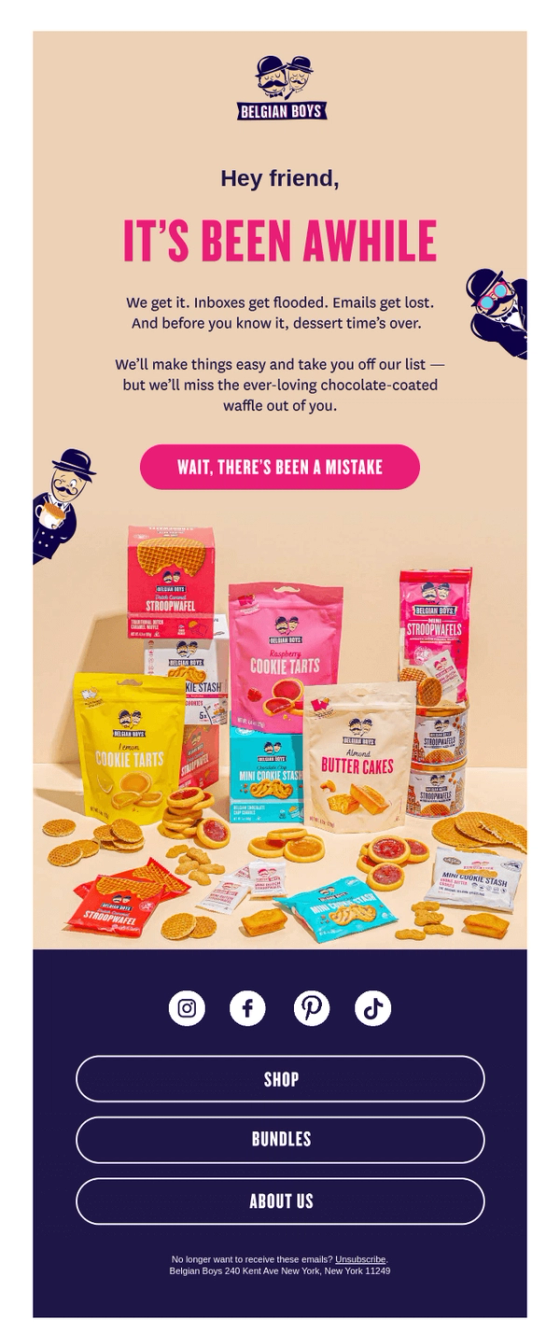
Belgian Boys makes staying on the mailing list the main action. The prominent button gives readers a direct way to confirm their interest.
Design your re-engagement email with Nexie.
Template summary and further reading
| Category | Main purpose | Examples and detailed guides |
|---|---|---|
| Welcome | Deliver the signup benefit and introduce the store | Welcome examples · Nexie’s welcome series guide |
| Abandoned cart | Help the shopper return to an unfinished purchase | Cart examples · Nexie’s abandoned cart guide |
| Promotional | Explain a relevant offer, launch, or preorder | Promotional email examples · Product launch examples · Black Friday design ideas |
| Post-purchase | Provide order information or useful product guidance | Recent-purchase examples · What to send after an order · Nexie’s post-purchase engagement guide |
| Educational | Answer a product or category question | Grinding guide example · Black coffee guide example |
| Product recommendation | Explain relevant product suggestions | Ugmonk example · Haoma example · Nexie’s recommendation guide |
| Loyalty and rewards | Explain the member’s points, rewards, or benefits | Loyalty examples |
| Win-back and re-engagement | Offer a reason to return or confirm continued email interest | Win-back examples · Nexie’s win-back guide |
Adapt the template to the customer
A template gives you a starting point. Customer activity and business conditions should guide what goes into it, when it is sent, and whether a follow-up is still useful.
Review what happens after each send. If customers who read a sizing guide still ask the same fit question, improve the explanation. If someone buys before a reminder goes out, stop that reminder.
Use purchases, replies, clicks, and reward use to improve the next version. Keep those changes within your brand’s offer rules, stock limits, and frequency caps so each email reflects what the customer needs and what the business can deliver.